Parents lose approximately 44 days of sleep in their baby's first year. That staggering reality is why finding a monitor that doesn't just watch—but actually teaches you something valuable about your child's sleep—matters so much. The Nanit Pro Smart Baby Monitor promises exactly that: crystal-clear visibility combined with actionable sleep insights that transform nursery monitoring from a safety tool into a wellness dashboard.
The smart baby monitor market has exploded over the past five years, yet most devices still operate like upgraded nanny cameras. Nanit took a different approach by combining 1080p HD video with sensor-free breathing motion tracking and AI-powered sleep analytics, creating a monitor that appeals to data-conscious parents who want to understand why their baby sleeps the way they do.
Discover how the Nanit Pro can transform your approach to infant sleep monitoring.
Beyond Basic Video: What Makes Nanit Pro's Sleep Analytics Different
How Sensor-Free Breathing Motion Monitoring Works Without Wearable Sensors
The Breathing Wear band included with your Nanit Pro uses a custom-designed pattern that the camera's AI recognizes and analyzes. Unlike traditional chest sensors or pulse oximeters, this system employs computer vision to detect subtle breathing movements. The camera reads the band's pattern in real-time and translates those visual cues into breathing data, eliminating the need for electronic components against your baby's skin.
The Breathing Wear Band Technology and Why It's a Game-Changer
Parents appreciate the Breathing Wear approach because it's non-invasive and eliminates anxiety about wires or sensors directly on their infant. The band sits across the chest during sleep, and the Nanit Pro's AI algorithms process the visual information continuously. This technology has become a significant selling point for families who want peace of mind without traditional wearable technology.
Real-Time Sleep Stage Detection and Sleep Quality Insights
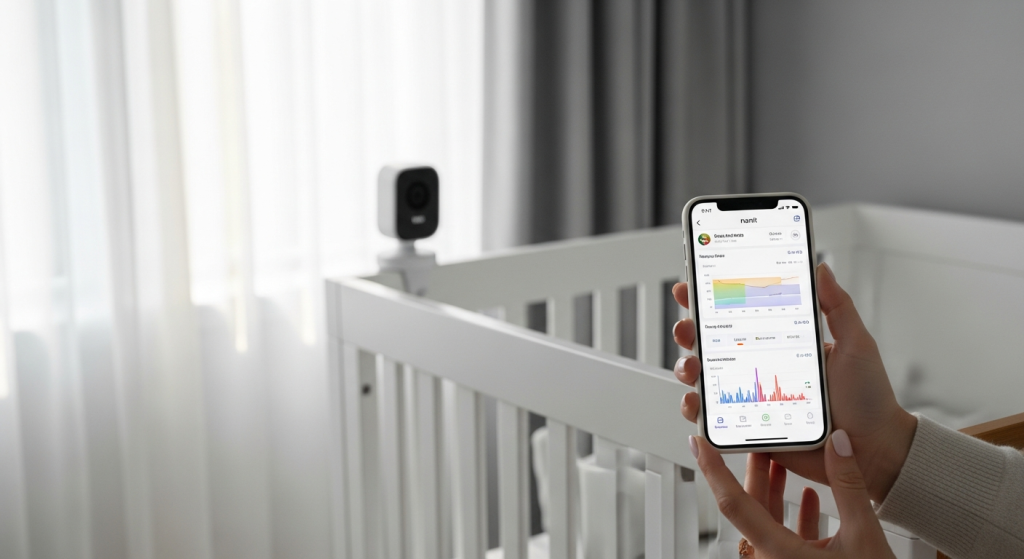
The monitor identifies light, deep, and REM sleep stages as they occur. This distinction matters because each stage contributes differently to your baby's development and growth. Nanit's analytics track which sleep stages your baby experiences and for how long, providing data that helps you understand whether sleep quality is improving or declining.
Personalized Sleep Reports That Track Duration and Quality Trends
Over weeks and months, the Nanit app compiles sleep duration, wake frequency, and quality trends into detailed reports. You can see patterns emerge—whether your baby sleeps better at certain times, how naps compare to nighttime sleep, and how sleep evolves as your child grows. This historical perspective is something basic monitors simply cannot provide.
How AI-Powered Insights Help Identify Sleep Regressions Early
The AI recognizes deviations from your baby's personal sleep baseline. When patterns shift—perhaps indicating an incoming sleep regression—the system alerts you before sleep deteriorates significantly. Early detection allows you to adjust routines or seek professional guidance before full regression occurs.
Integration With Pediatric Sleep Science Research
Nanit's recommendations are grounded in established pediatric sleep research. The insights you receive aren't arbitrary suggestions but evidence-based guidance aligned with how child sleep experts understand infant development.
Comparison With Basic Video-Only Monitoring
Traditional baby monitors show you what's happening in the crib right now. Nanit Pro shows you what's been happening over time and predicts what might happen next. This shift from reactive to proactive monitoring represents a genuine advancement in how parents can engage with their baby's sleep.
How Historical Data Builds a Sleep Profile Over Months
The longer you use Nanit Pro, the more valuable the data becomes. Three months of sleep data reveals patterns invisible in three days. Six months of data shows seasonal changes, developmental milestones, and individual sleep preferences unique to your child.
The Security Architecture Parents Need to Know About
Military-Grade 256-Bit AES Encryption
The same encryption standard that protects banking transactions secures your Nanit Pro streams. This 256-bit AES encryption is industry-leading and means that even if someone intercepted your video data, it would be mathematically impossible to decode without the encryption key.
Mandatory Two-Factor Authentication Setup
Account access requires both your password and a second verification method—typically a code sent to your phone. This two-layer approach prevents unauthorized access even if someone discovers your password.
Local Video Processing Features
Nanit processes some data locally on the camera itself rather than sending everything to cloud servers. This architecture reduces the amount of sensitive footage transmitted across the internet and stored on external servers.
Privacy Controls That Allow Recording Disablement
You can disable recording during specific hours, giving you complete control over when footage is captured and stored. This feature appeals to parents concerned about total surveillance, even in their own nursery.
End-to-End Encryption for Video Streams
Video travels encrypted from your camera directly to your phone or tablet. The data remains encrypted throughout transmission, protecting it from interception.
GDPR and CCPA Compliance
For families in Europe or California, Nanit maintains compliance with stringent data protection regulations. Your data rights are protected under these frameworks.
How Nanit Handles Data Deletion and Account Termination
When you delete your account or request data removal, Nanit permanently erases your information from their servers. You're not paying for a service where your data lingers indefinitely.
Third-Party Security Audits and Certifications
Independent security firms have audited Nanit's systems, validating the encryption and security claims. These third-party certifications provide assurance beyond the company's own statements.
Setting Up Your Nanit Pro: Mounting Options for Every Nursery Layout
Wall Mount Installation for Overhead Bird's-Eye View Positioning
The wall mount allows you to position the camera directly above the crib, capturing a view that shows your baby's entire body and movement patterns. This overhead positioning is ideal for maximizing the breathing motion detection accuracy and sleep stage recognition.
Floor Stand Flexibility for Renters
The floor stand option eliminates the need for wall drilling, making it perfect for rental properties where you can't modify walls. It provides stable positioning without permanent installation.
Portable Flex Stand Design for Travel
The Flex Stand offers maximum portability. Take it to grandparents' houses, vacation rentals, or temporary childcare spaces. Its flexible design adapts to various surfaces and angles.
Optimal Camera Angle Recommendations
Position the camera so the crib occupies the center of the frame with adequate margin on all sides. Avoid extreme angles that distort the image or position the baby too close to the edge of the frame where movements might go undetected.
Wi-Fi Placement Considerations
Strong signal strength is critical. Position your router within reasonable distance of the nursery, or consider Wi-Fi extenders if your router is too far away. Dead zones in your home will cause monitoring interruptions.
Cable Management Tips
Keep cables away from the crib and out of reach of older siblings. Use cable covers or clips to create a clean setup that eliminates tripping hazards and keeps everything organized.
Adjusting Camera Height as Your Baby Grows
As your baby transitions from bassinet to crib to toddler bed, you may need to adjust the camera angle. Plan your initial placement with growth in mind, allowing room for vertical adjustment without remounting.
Compatibility With Existing Smart Home Setups
The Nanit Pro integrates with Amazon Alexa and Google Home, so it fits into existing smart home ecosystems. During setup, you can establish these connections to control the monitor through voice commands.
The Subscription Reality: Nanit Insights Costs and What You Actually Get
Base Features Available Without Subscription
Live video, two-way audio, real-time sound alerts, motion detection, temperature and humidity monitoring, and cry detection are all available without paying for Nanit Insights. You get functional monitoring without the subscription cost.
What Nanit Insights Subscription Unlocks
The subscription tier ($9.99–$14.99 monthly) grants access to historical sleep data, detailed sleep reports, personalized insights, sleep stage detection, breathing pattern analysis, and AI recommendations. These advanced analytics require the subscription.
Monthly vs. Annual Subscription Pricing
Monthly subscriptions cost more per month than annual plans, but annual plans require committing to 12 months upfront. Consider your family's long-term plans before choosing a billing cycle.
Free Trial Period Details
You typically receive a free trial period after purchase, allowing you to experience Nanit Insights without immediate charges. The trial period varies, so check your order for specific details.
Is the Subscription Cost Justified by the Data Insights Provided?
That depends on your priorities. If you're driven by understanding sleep patterns and identifying issues early, the subscription delivers value. If you're satisfied with basic monitoring, the subscription fee may feel unnecessary.
Alternative Features You Can Access Through the Free Nanit App
The free app tier includes live viewing, two-way communication, alerts, and basic monitoring. You lose the historical analytics and detailed reports, but core functionality remains accessible without subscription costs.
HSA and FSA Eligibility
The camera itself qualifies for HSA and FSA reimbursement, offsetting your initial purchase cost if you have these accounts. The subscription, however, does not qualify for reimbursement.
Explore the complete Nanit Pro system and subscription options to find your best fit.
Hidden Costs: Additional Accessories
The Home Display (a stationary tablet-style interface for your nightstand) costs extra. A Travel Case adds to the price if you're a frequent traveler. Budget for these accessories when calculating total investment.
Breathing Motion Monitoring Explained: How It Works and Why Parents Trust It
The Science Behind Sensor-Free Breathing Detection Using Computer Vision
The Nanit Pro's camera analyzes subtle chest wall movements visible in video. As your baby breathes, their chest rises and falls—movements the AI recognizes and quantifies. This computer vision approach requires no physical contact with your baby.
How the Breathing Wear Band Works With the Camera's AI Algorithms
The band contains a specific visual pattern that the AI tracks frame by frame. As your baby breathes, the pattern's position shifts infinitesimally. The algorithm calculates these tiny movements and translates them into breathing rate and rhythm data.
Accuracy Rates and Clinical Validation
Nanit has invested in research validating the accuracy of its breathing detection system. The results show correlation with clinical-grade monitoring, though no system is 100% accurate at all times.
Real-World Parent Testimonials About Peace of Mind
Parents frequently cite the breathing monitoring feature as the reason they chose Nanit Pro. Knowing their baby's breathing is being tracked continuously provides reassurance, especially for parents with anxiety or those with previous infant loss experience.
False Alarm Rates and System Distinctions
The AI distinguishes between normal movement and breathing-related concerns, reducing false alarms. However, no system is perfect—occasional false positives occur, particularly if your baby is swaddled in ways that obscure chest movement.
Integration With Pediatric Guidelines for Normal Infant Breathing Patterns
Nanit's algorithms account for age-appropriate breathing rates. A newborn's normal breathing differs from a 9-month-old's normal breathing, and the system adjusts expectations accordingly.
Limitations: What the Breathing Monitor Can and Cannot Detect
The breathing monitor detects presence or absence of breathing and rhythm irregularities. It cannot diagnose medical conditions, cannot detect low oxygen saturation levels, and should never replace medical-grade pulse oximetry for at-risk infants.
How This Feature Differs From Wearable Pulse Oximeters or Chest Sensors
Pulse oximeters measure oxygen levels; Nanit monitors breathing patterns. The technologies serve different purposes. Nanit's approach is less invasive but also less clinically intensive than medical-grade monitoring devices.
Two-Way Audio, Cry Detection, and Real-Time Alerts That Actually Work
Crystal-Clear Two-Way Audio Quality
The Nanit Pro's microphone and speaker deliver clear, lag-free communication. You can hear your baby and speak back to them immediately, making soothing from another room genuinely effective.
Cry Detection Algorithms and Accuracy
The AI recognizes crying versus other baby vocalizations. Its accuracy improves over time as it learns your baby's individual sounds, though it occasionally flags fussiness as crying.
Sound Threshold Customization
Adjust sensitivity to avoid false alerts from white noise machines, pets, or household activity. Customization prevents alert fatigue from constant low-level notifications.
Motion Detection Sensitivity Settings
Set motion alerts to trigger only at your preferred sensitivity level. Tighter sensitivity catches small movements but generates more notifications; looser sensitivity reduces alerts but misses minor activity.
Temperature and Humidity Monitoring
The monitor tracks nursery conditions continuously. Ideal ranges are 68–72°F with moderate humidity. Alerts notify you if temperature climbs above or drops below safe levels, allowing you to adjust quickly.
Push Notification Timing and Alert Fatigue Prevention
Configure notification frequency and timing. You can batch alerts into periodic updates rather than receiving constant notifications, reducing the mental burden of constant monitoring.
Integration With Amazon Alexa and Google Home
Use voice commands to check on your baby or adjust settings hands-free. Ask Alexa to show the nursery camera on a smart display, or ask Google Home to increase the monitor's volume.
Multi-User Access for Partners, Grandparents, and Nannies
Multiple people can access the same camera simultaneously. Each user gets independent app access, allowing caregivers to check in without sharing passwords.
The Video Quality Verdict: 1080p HD and Night Vision Performance
1080p Resolution Clarity
The 1080p HD video delivers sharp, detailed imagery. You can distinguish facial features, expressions, and small movements clearly. This clarity matters when trying to determine whether your baby is actually awake or just stirring.
Night Vision Quality With Infrared Technology
The infrared night vision operates in complete darkness without a visible red light, though the technology is detectable by the eye. Video quality in night mode matches daytime clarity reasonably well, though not with identical sharpness.
Color Video During Daytime and Low-Light Performance
Daytime video displays in full color. In dimly lit rooms, the camera transitions to infrared, preserving visibility without the glare that would come from bright visible light.
Frame Rate and Latency for Smooth, Real-Time Streaming
The monitor streams at sufficient frame rate to show movement fluidly. Latency remains minimal, allowing you to see events in near-real-time rather than experiencing noticeable delays.
Digital Zoom Capabilities
The app includes digital zoom, allowing you to enlarge the image for closer inspection. Understand that digital zoom works by cropping and enlarging existing pixels, so extreme zoom degrades image quality.
Video Recording Storage Options
Cloud storage holds video history for review. Local storage options vary depending on your subscription tier. Understand what footage is retained and for how long.
Bandwidth Requirements and Impact on Home Wi-Fi Networks
Nanit Pro requires moderate bandwidth—typically 0.5–2 Mbps depending on settings. This leaves plenty of capacity for other household devices on most modern broadband connections.
Video Quality Consistency Across iOS and Android Apps
Both platforms deliver equivalent video quality and performance. You're not sacrificing anything by using Android instead of iOS, or vice versa.
Honest Limitations: What the Nanit Pro Can't Do
Fixed Camera View Without Pan-Tilt-Zoom Remote Control
You cannot remotely pan, tilt, or zoom the camera. If your baby rolls across the crib and out of frame, you cannot follow them electronically. You must physically adjust the camera angle.
Manual Adjustment When Babies Move Out of Frame
Active crawlers and toddlers will periodically position themselves outside the camera's view. Plan your camera placement knowing you'll need occasional manual repositioning.
Wi-Fi Dependency and Performance Issues
If your Wi-Fi disconnects, monitoring stops immediately. Network instability in your nursery will disrupt the service. Dead zones in your home mean gaps in coverage.
Travel Scenarios Without Reliable Wi-Fi
Visiting areas with poor internet connectivity becomes problematic. Hotels with metered Wi-Fi or vacation rentals with unreliable connections limit the monitor's usefulness.
Visible Red Night Vision Lights
Some users mention that the infrared lights are visible to the human eye, particularly in very dark rooms. This aesthetic consideration bothers some parents aesthetically, though it has no functional impact.
Limited Customization of the App Interface
The app layout is fixed. You cannot rearrange screens or customize the interface beyond basic settings. Some users prefer more personalization options.
No Local Backup if Wi-Fi Goes Down
When your Wi-Fi connection fails, you lose all monitoring capability. The camera has no local storage option for independent operation without internet connectivity.
Subscription Requirement for Accessing Historical Data
All the advanced analytics that make Nanit Pro distinctive require a paid subscription. Without it, you're paying premium prices for basic monitoring capabilities.
Investment Breakdown: Is $289–$499 Worth It for Your Family?
Base Camera Pricing Compared to Budget and Mid-Range Monitors
At $289.99–$299.90, Nanit Pro sits in the premium segment. Budget monitors cost $100–$150; mid-range options run $150–$250. The Nanit Pro premium reflects its advanced analytics and video quality.
Bundle Options and Whether Accessories Provide Genuine Value
Bundles incorporating the Home Display or Travel Case cost $339.99–$499.00. Evaluate whether you genuinely need these accessories or if buying the camera alone better suits your budget.
Long-Term Cost Analysis Over 2–3 Years
Camera: $290. Monthly subscription (3 years): $360–$540. Total: $650–$830. This calculation helps you understand the true cost commitment before purchase.
Resale Value and Market for Used Nanit Pro Monitors
Nanit Pro holds resale value reasonably well. Used units sell for 50–70% of original price, meaning your net cost depreciates over time.
Cost-Per-Month Breakdown
$290 camera ÷ 36 months = $8.06 monthly camera cost. Add $9.99–$14.99 monthly subscription = $18–$23 monthly total. Over a year, that's $216–$276 invested in infant sleep intelligence.
ROI Perspective: Sleep Insights' Value Against Stress Reduction
Sleep consultant fees run $200–$500+ per session. If Nanit Pro's insights prevent one expensive consultation, the ROI becomes apparent. Factor in the immeasurable value of reduced parental anxiety.
Comparison With Sleep Consultant Costs
A single sleep consultant session can cost more than a month of Nanit Pro subscription. Multiple consultations quickly exceed the annual cost of the monitor plus subscription.
Payment Plans or Financing Options
Check with retailers offering Nanit Pro for financing options. Some support monthly payments, making the upfront cost more manageable.
Who Should Buy the Nanit Pro (And Who Might Want to Skip It)
Ideal for Data-Driven Parents
If you're someone who wants quantifiable evidence of your baby's sleep quality, sleep patterns, and progress, Nanit Pro aligns with your parenting approach. The analytics appeal to parents who feel empowered by data.
Perfect for Families With Sleep Issues or Developmental Concerns
Families with a history of sleep problems, developmental delays, or medical conditions benefit from the detailed monitoring and trend analysis Nanit Pro provides.
Great for Multi-Caregiver Households
When multiple people care for your baby—nannies, grandparents, co-parents—the shared access and detailed handoff information becomes invaluable. Everyone sees the same sleep picture.
Best for Parents With Stable Wi-Fi Setups
If your home has robust, reliable Wi-Fi coverage in the nursery, you'll avoid connectivity frustrations that plague less reliable setups.
Consider Alternatives if You're on a Tight Budget
Basic monitors under $150 offer functional video monitoring without sleep analytics. They won't provide insights, but they will watch your baby safely.
Not Ideal for Frequent Travelers
If you move between locations without reliable internet, the Wi-Fi dependency becomes a limitation. Consider alternatives for travel-heavy families.
Skip It if You Prioritize Pan-Tilt-Zoom Functionality
Competing monitors offer remote pan-tilt-zoom control, allowing you to follow your baby electronically. If that feature matters to you, other options serve that need better.
Excellent Choice for Privacy and Security-Conscious Parents
If data security and privacy are your top concerns, Nanit Pro's military-grade encryption and rigorous security architecture provide genuine peace of mind.
The Data-Driven Approach to Infant Sleep: Your Next Move
The Nanit Pro Smart Baby Monitor represents a fundamental shift in how modern parents approach nursery monitoring. It's not just about watching your baby—it's about understanding the patterns, rhythms, and quality of their sleep in ways that were impossible just five years ago. The combination of 1080p video clarity, sensor-free breathing motion tracking, and AI-powered sleep analytics creates a genuinely comprehensive picture of your child's well-being.
That said, the investment demands honesty. You're looking at $289 upfront for the camera, plus $9.99–$14.99 monthly for Nanit Insights to unlock the full analytical power. Over three years, that's roughly $600–$700 total—a significant commitment. The fixed camera view and Wi-Fi dependency are real limitations that won't work for every family.
The question isn't whether Nanit Pro is the best monitor on the market. The question is whether the data-driven insights align with how you parent. If you're someone who finds comfort in understanding your baby's sleep patterns, who wants to catch potential issues early, and who can justify the subscription cost, then the Nanit Pro delivers exceptional value. Your decision ultimately comes down to this: Do you want a baby monitor, or do you want a sleep intelligence system?
Start your journey toward data-driven infant sleep with the Nanit Pro today.